File organizer for Windows and Mac (beta)
Automatically
sort your files.
TidyFile is a lightweight Windows and Mac app that moves files to the right folder using rules you set once, then keeps working quietly in the background. No scripts, no manual tidying.
See how messy your Downloads folder is · Free for 7 days, then £4.99/month · No card needed · Your files never leave your computer
Downloads
0 files
Free check-up
How messy is your Downloads folder?
Pick your Downloads folder and see what's really in there, and exactly where TidyFile would put it. It runs in your browser: nothing is uploaded.
Pick your Downloads folder, or any folder inside Desktop or Documents. We only read file names, sizes and dates.
Try it here
Tidy a messy Downloads folder yourself.
Five simple rules. One click. This is what TidyFile does on your computer, automatically, every time a new file arrives.
Downloads
11 files
- PDFinvoice-march.pdf
- JPGIMG_4021.jpg
- EXEsetup-zoom.exe
- PNGpanorama-8K.png120 MB
- ZIPphotos-holiday.zip
- DOCXCV-2026.docx
- PNGScreenshot 14.32.png
- PDFbank-statement.pdf
- MSInode-v22.msi
- ZIPfonts.zip
- GIFmeme.gif
Your rules
- 1over 100 MBLarge files
- 2.pdf .docxDocuments
- 3.jpg .png .gifPictures
- 4.zipArchives
- 5.exe .msiInstallers
Rules run top to bottom and the first match wins, so a huge photo goes to Large files, not Pictures. Move rules up or down to change the order.
Documents
0Pictures
0Archives
0Installers
0Large files
0Powerful Features
Smart organization
made simple.
TidyFile gives you complete control over how your files are sorted, with easy-to-use rules and powerful options.
Custom sorting rules
Sort by file type, date, name, size, or location. Combine conditions with AND / OR.
Rename, delete or tag
Not just sorting. Keep your files exactly how you want them with powerful actions.
Runs in the background
Set it up and forget it. TidyFile works quietly while you get on with your day.
Multiple profiles
Create different rule sets for work, personal, or project folders.
Simple, clean interface
No clutter. No confusion. Just a straightforward app that does the job.
Your data, your control
All processing happens locally on your device. Your files never leave your computer.
Inside the app
Powerful enough for years of mess.
Safe enough to trust with it.
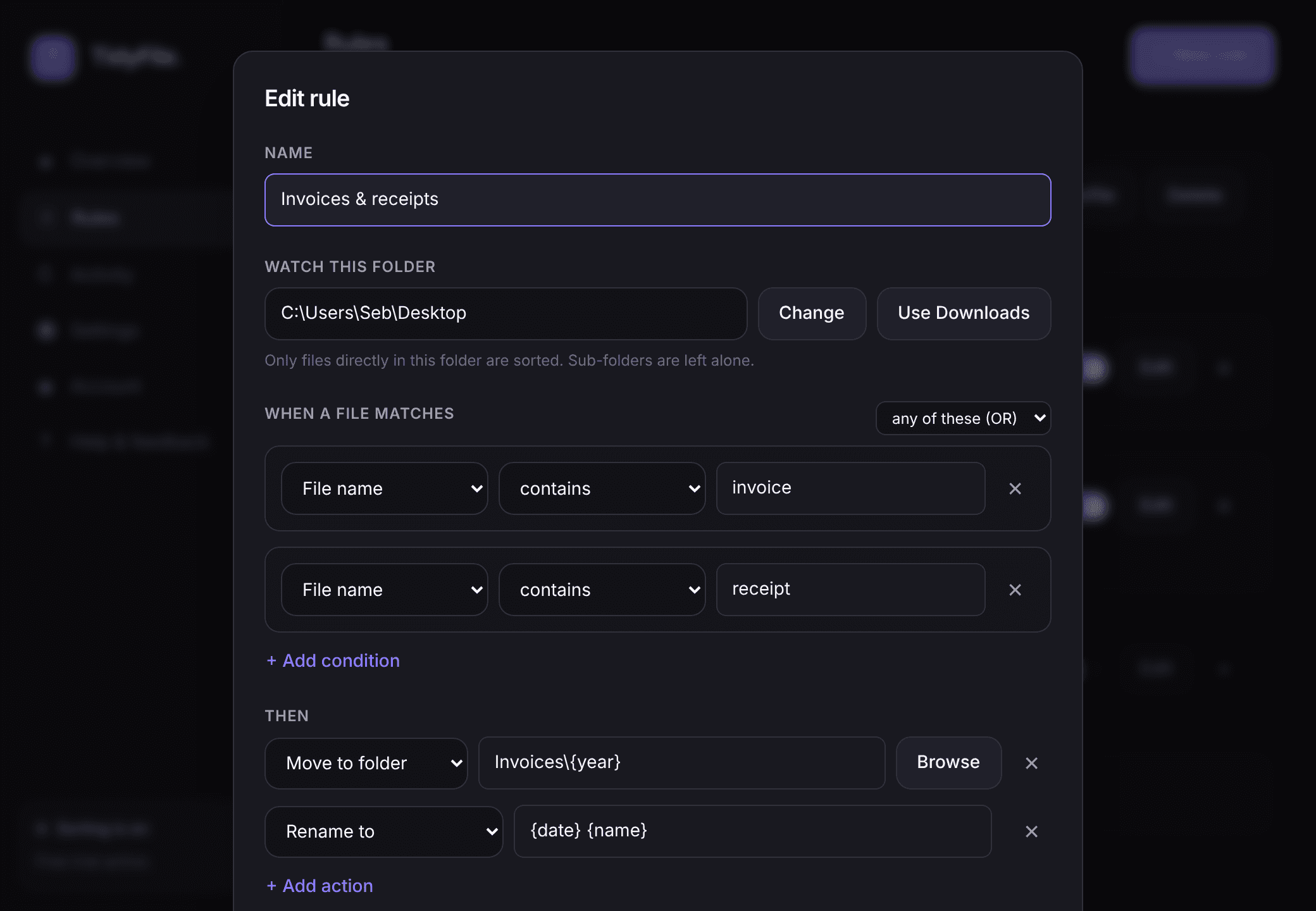
Build a rule in seconds
Match by type, name, size or age, then move, rename, tag or recycle. Or start from a ready-made rule.
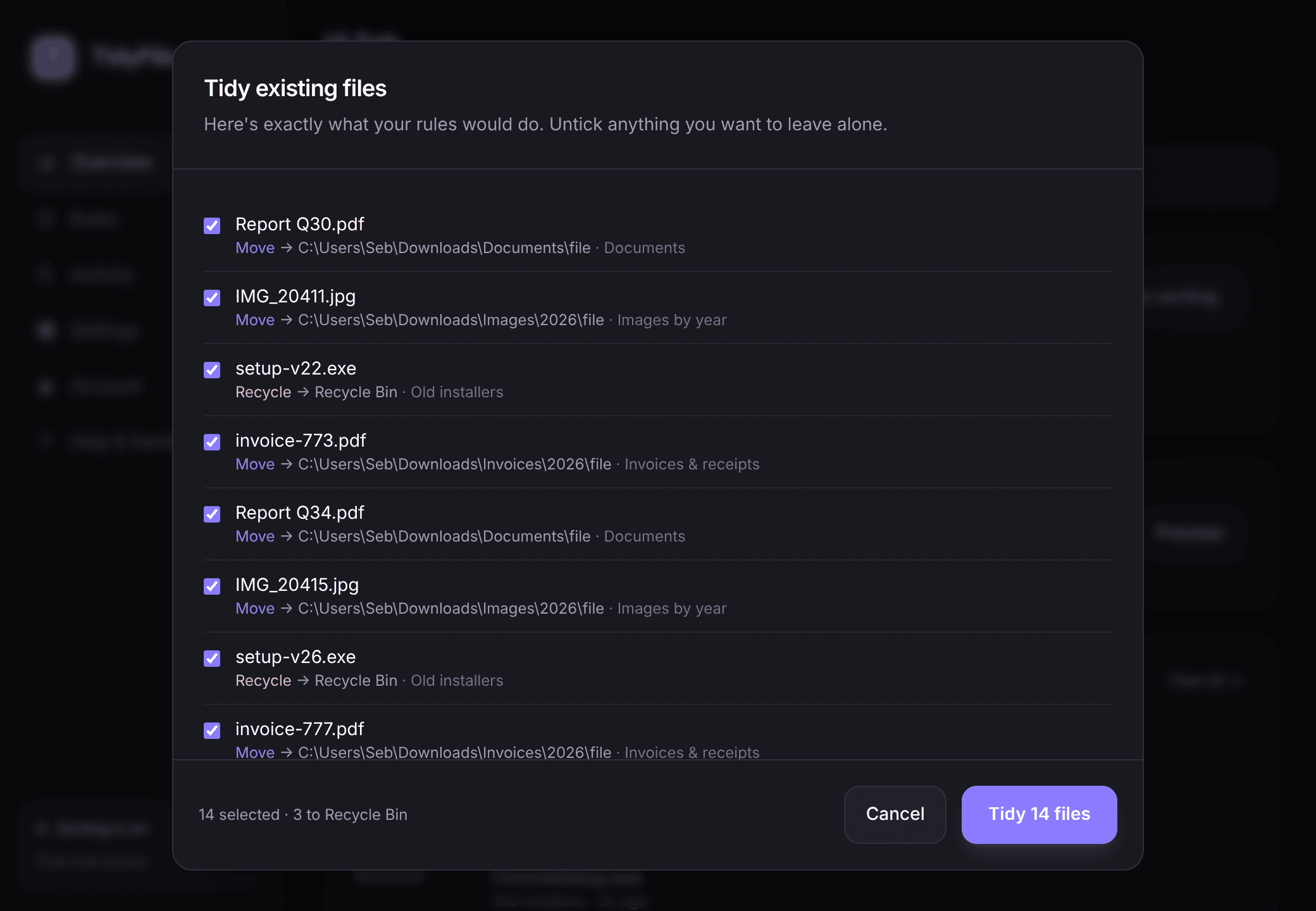
See it before it happens
Preview exactly where every existing file will go, untick anything you want left alone, then tidy in one click.
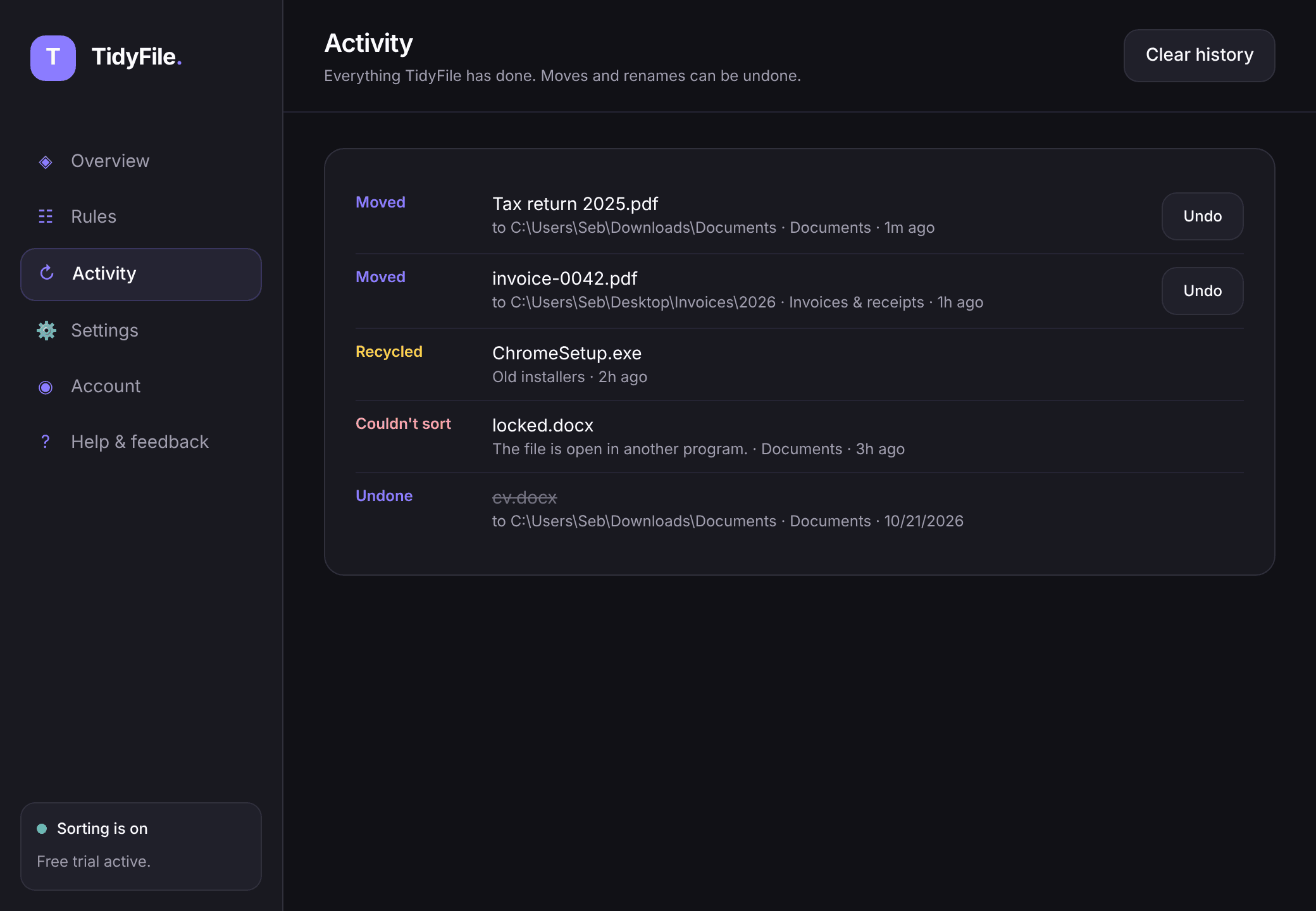
Change your mind? Undo it
Every move is logged. Put any moved or renamed file back where it was with a single click.
How it works
Set your rules.
Let TidyFile handle the rest.
In just a few clicks, you can set up powerful sorting rules. TidyFile will then monitor your folders and automatically organize your files, saving you hours of manual work.
Create rules
Choose what to sort, how to sort it, and what to do with the files.
Watch it work
TidyFile monitors your folders and applies your rules automatically.
Stay organized
Your files are neatly sorted, renamed or tagged - without lifting a finger.
Simple pricing
One plan. Everything included.
Less than a coffee a month to never sort your Downloads folder by hand again.
TidyFile Standard
£4.99/ month
or £49.99/year · 7-day free trial · No card needed
- Rules by type, name, size and date
- Watch Downloads or any folder
- Move, rename, tag or recycle files
- Tidy existing files in one click, with undo
- Starts when you sign in, works in the background
FAQ
Questions before you download?
What does TidyFile do?+
TidyFile is a Windows and Mac app that automatically organizes your files. You create rules, such as moving every PDF into a Documents folder or recycling installers older than 30 days, and TidyFile applies them in the background so you never have to tidy up manually.
Is there a free trial?+
Yes. Every new account gets a 7-day free trial, started from inside the app. No card is needed. If you'd like to keep TidyFile, add a card before the trial ends; if not, it simply stops sorting and you're never charged.
How much does TidyFile cost?+
After the free trial, TidyFile Standard costs £4.99 per month or £49.99 per year (in the US, $4.99 per month or $49.99 per year). You can cancel at any time.
What can my rules do?+
Rules can match files by type, name, size, or how old they are, combining conditions with AND or OR. They can move files to any folder (including date-based folders), rename them, add a tag to the name, or send them to the Recycle Bin. You can watch Downloads or any other folder, and keep separate rule sets as profiles.
What happens to the files I already have?+
Use "Tidy existing files" to see a preview of exactly what will move before anything happens. Every change appears in the activity log and moves and renames can be undone.
Do my files get uploaded anywhere?+
No. All file processing happens locally on your computer. Your files never leave your computer.
Does TidyFile need to stay open?+
No. TidyFile starts when you sign in and lives in the system tray (the menu bar on a Mac), so it keeps organizing new files without you having to open it. You can turn this off in Settings.
Is TidyFile available for Mac?+
Yes, as a beta you can download today. TidyFile runs on Macs with Apple silicon (M1 and later) and on Intel Macs running macOS 10.15 or later, with the same subscription as on Windows. It isn't notarised by Apple yet, so macOS asks you to approve it once in System Settings → Privacy & Security (Open Anyway).
How do I cancel my subscription?+
Open Account in the TidyFile app and choose Manage subscription, or use the Manage subscription link on the pricing page. You can cancel or switch between monthly and annual at any time.
Already subscribed? Manage your subscription.